What Trust Signals Should a Small Business Website Have?
Updated: 4 days ago
What trust signals should a small business website have?
At a minimum, a potential customer should be able to see who you are, what you do, where you work, how to contact you, evidence that you have helped real customers, what they can expect from the service and what happens if they decide to enquire.
That evidence might include:
genuine customer reviews
testimonials
examples of completed work
case studies
clear contact details
realistic pricing or pricing guidance
qualifications and accreditations
a clear service area
photographs of real work or people
a simple explanation of your process
useful FAQs
clear information about what the customer receives
The important point is that trust is built through evidence, not claims.
Saying:
We are professional, reliable and customer-focused.
does not prove very much.
Showing:
47 customer reviews, photographs of completed work, clear pricing, named qualifications and a straightforward explanation of what happens after someone enquires.
is considerably stronger.
If people are already finding your website but are not contacting you, weak trust may be one part of the problem. See Why Your Website Gets Visitors But No Enquiries for the wider conversion diagnosis.

What Trust Signals Should a Small Business Website Have? The Quick Answer
A strong small business website should answer six trust questions quickly:
Is this a real business?
Do they actually provide the service I need?
Do they work with customers like me?
Can I see evidence that they know what they are doing?
Do I understand what I am likely to receive?
Do I feel comfortable contacting them?
The exact trust signals needed will vary.
A builder, accountant, photographer and SEO consultant should not all use identical proof.
But the principle is the same:
Remove uncertainty with specific evidence.
Trust signals should make it easier for someone to move from:
I have found this business
to:
I understand this business
to:
I believe they may be able to help me
to:
I am comfortable enquiring.
What Is a Website Trust Signal?
A trust signal is anything on your website that gives a visitor a genuine reason to feel more confident about your business.
It might prove:
that the business is real
that you have relevant experience
that other customers have used you successfully
that you operate in the visitor's area
that your service is clearly defined
that your prices are not deliberately hidden
that you have appropriate qualifications
that somebody can contact you easily
that you have a sensible process
that the visitor understands what will happen next
Some trust signals are obvious.
A five-star customer review is clearly social proof.
Others are less obvious.
A plainly written service page, transparent pricing and an enquiry form that explains what happens next can all make the business feel more credible because they reduce uncertainty.
That is why trust should not be treated as a row of logos at the bottom of the homepage.
It runs through the whole website.
1. Genuine Customer Reviews
For many small businesses, customer reviews are one of the strongest forms of trust evidence available.
A business saying:
We provide excellent customer service.
is a claim.
A customer explaining:
The engineer arrived when promised, explained the fault and repaired the boiler the same morning.
is evidence.
Useful reviews are often specific.
They mention:
the service provided
the problem solved
the customer's experience
communication
reliability
quality
the outcome
Where possible, use genuine reviews from recognised sources rather than creating anonymous quotations that could have been written by anybody.
And do not make visitors hunt for them.
Reviews should appear near the parts of the website where people are deciding whether to trust the business.
2. Testimonials Relevant to the Service
A dedicated Testimonials page can be useful.
But it should not be the only place testimonials appear.
Imagine a potential customer is reading your Boiler Repair page.
A testimonial saying:
Great company, highly recommended.
provides some reassurance.
A testimonial saying:
Smith Heating diagnosed our boiler fault in Chester and had the heating working again the same afternoon.
is far more relevant.
The best testimonial is not necessarily the longest or most enthusiastic one.
It is the one that helps resolve the uncertainty the customer has on that particular page.
This is why relevant testimonials should often appear directly on:
service pages
location pages
pricing pages
case studies
enquiry pages
rather than being locked away in one central testimonial archive.
3. Real Examples of Your Work
If you claim to do something, show evidence.
For trades and visual services this might include:
completed installations
before-and-after photographs
finished projects
examples of repairs
completed designs
customer projects
For professional services the equivalent might be:
anonymised reports
screenshots
example deliverables
case studies
sample recommendations
documented results
The evidence should match what the customer is considering buying.
A potential SEO Review customer, for example, gains more confidence from seeing what an actual review looks like than from reading another paragraph saying the review is “comprehensive”.
That is why showing a real example of what the customer receives can be such a strong trust signal.
4. Case Studies
A case study goes one step beyond a testimonial.
Instead of simply saying a customer was happy, it shows:
the situation
↓
the problem
↓
what you did
↓
what changed
For example:
Problem
A local service website had traffic but very few enquiries.
Finding
Important service pages were vague, proof was hidden and the contact route was unclear.
Changes
The page structure, service explanations, testimonials and calls to action were improved.
Outcome
Visitors could understand the service and next step more easily.
A useful case study does not need exaggerated statistics.
In fact, a specific and believable explanation is usually stronger than vague claims such as:
We transformed their online presence.
Show the work.
Show your reasoning.
Show what changed.
5. Clear Contact Details
Anonymous websites create uncertainty.
A genuine business should normally make it reasonably easy for someone to identify how to contact it.
Depending on the business, that might include:
business name
email address
telephone number
contact form
registered address
trading address
service area
company information
named contact person
You do not need to publish information that is inappropriate for your business model.
A service-area business does not need to pretend it has offices in every town it serves.
But a visitor should not be left wondering:
Is there actually a real business behind this website?
Make the contact route clear.
How those contact details are presented matters too. Our guide to showing an email address as well as a contact form explains why providing a sensible alternative contact route can reduce uncertainty without cluttering the page.
6. Clear Service-Area Information
For a local business, location itself can be a trust signal.
Someone searching for:
boiler repair Chester
needs reassurance that the company genuinely covers Chester.
A visitor should not have to dig through the footer to discover whether you operate anywhere near them.
Make it clear:
where you are based
which areas you genuinely serve
whether you travel to customers
whether some services have different coverage
That does not mean stuffing every nearby town into every paragraph.
Clear and accurate location information is stronger than artificial local wording.
If the challenge is deciding where that information belongs, see where to list the areas you serve on your website for examples covering the homepage, individual service pages, contact page, service-area page and footer.
If local visibility is important to your business, see Local SEO for Small Businesses for the wider relationship between service areas, local relevance and Google visibility.
If you cover several towns and are deciding whether each one needs its own page, also see Should I Create a Page for Every Town I Serve?.
7. Pricing or Pricing Guidance
Price uncertainty stops some visitors enquiring.
That does not mean every business must publish a fixed price list.
Some services are genuinely too variable.
But consider whether you can provide:
fixed prices
starting prices
typical ranges
example packages
minimum charges
what affects the cost
what is included
whether quotations are free
whether VAT is included
Compare:
Contact us for a quote.
with:
Boiler servicing starts from £X. Repairs are quoted after diagnosis, with the price agreed before additional work begins.
The second version reduces uncertainty.
Similarly, a professional service might say:
Reviews start from £99 for typical small business websites. Larger or more complex sites are quoted before work begins.
The customer now has enough information to decide whether enquiring is realistic.
Hiding every indication of price does not automatically generate more leads.
Sometimes it simply creates more hesitation.
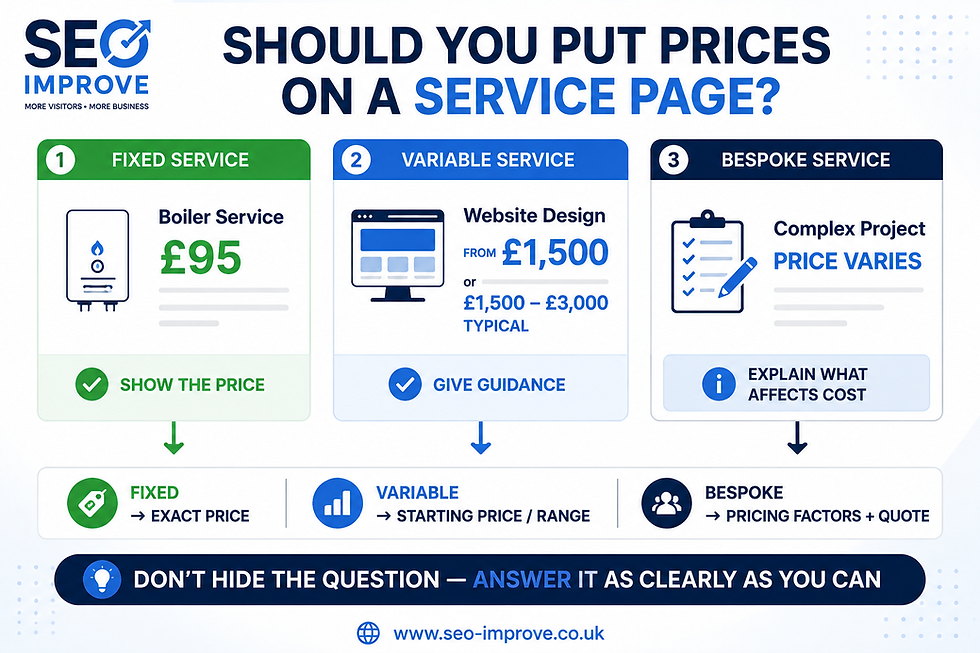
If you are deciding how much pricing information belongs on an individual service page, see whether you should put prices on a service page for guidance on fixed prices, starting prices, ranges and genuinely bespoke quotations.
8. Qualifications, Accreditations and Memberships
If qualifications matter to the service, show them.
Examples might include:
professional qualifications
industry memberships
Gas Safe registration
NICEIC registration
recognised accounting qualifications
trade memberships
manufacturer certifications
insurance information
relevant licences
But do not add badges merely because they look reassuring.
A meaningful accreditation is useful.
A collection of obscure logos with no explanation can become visual clutter.
Where appropriate, explain what the qualification actually means for the customer.
For example:
Gas Safe registered engineers are legally qualified to work on gas appliances.
That is more useful than displaying a logo without context.
9. Relevant Experience
“20 years of experience” can be useful.
But experience becomes much stronger when you make it specific.
Instead of:
We have extensive experience.
try:
We specialise in bookkeeping for owner-managed limited companies.
or:
We regularly repair Worcester Bosch, Vaillant and Ideal boilers.
or:
We review small business service websites, particularly local businesses, trades and independent service providers.
Specific experience helps the customer answer:
Have you dealt with a business or problem like mine before?
That is what matters.
10. A Clear Explanation of Your Process
Uncertainty is one of the biggest barriers to enquiries.
People often want to know:
What happens if I contact you?
A simple process can remove that concern.
For example:
1. Send us your website
Tell us which site you want reviewed.
2. We confirm the scope
You know what will be reviewed and what it will cost before work starts.
3. We complete the review
The important pages are reviewed manually.
4. You receive your recommendations
You get clear findings and priorities.
5. Decide what happens next
Implement the changes yourself or ask for help.
The process does not need a complicated animation or ten-step graphic.
It simply needs to make the unknown feel more predictable.
11. Explain Exactly What the Customer Receives
Many service websites describe the work but fail to explain the outcome.
For example:
We provide comprehensive SEO analysis.
What does that actually mean?
A stronger explanation might say the customer receives:
an executive summary
page-by-page findings
priority actions
recommended title changes
content observations
internal-link recommendations
trust and conversion observations
The buyer can now picture what they are paying for.
The same principle applies to almost every service.
Do not just explain what you do.
Explain what they receive.
If your existing service pages are very broad or unclear, Should Every Service Have Its Own Page? explains when a more focused service page may be appropriate.
12. Real Photographs and Real People
Stock photography can make a website look polished.
It rarely proves much.
Where appropriate, real imagery can add considerably more credibility:
the business owner
the team
completed jobs
equipment
premises
vehicles
examples of work
the actual product or deliverable
That does not mean every website needs professional corporate photography.
A clean, genuine photograph can be more persuasive than an immaculate stock photograph of people who have never worked for the business.
The image should help answer:
Is this a real company doing real work?
13. Useful Frequently Asked Questions
FAQs can reduce uncertainty before somebody contacts you.
Good questions are the ones customers genuinely ask.
For example:
How much does it cost?
How long does the process take?
Which areas do you cover?
What happens after I enquire?
Do I need to pay upfront?
Can you work with my existing website?
What happens if the problem cannot be fixed?
Avoid creating thirty superficial FAQs purely because you think more content means better SEO.
Answer the questions that genuinely prevent customers taking the next step.
On an individual service page, those questions should be tightly related to the service and the customer's buying decision. See whether service pages should have FAQs for examples of useful pricing, process, coverage and reassurance questions — and which questions are better handled elsewhere on the page.
14. Professional Website Basics
Trust can also be damaged by simple mistakes.
A website may make a good first impression visually but lose confidence through:
broken links
spelling errors
obvious placeholder text
pages that do not work
outdated information
inconsistent business details
buttons that lead nowhere
forms that fail
images that do not load
poor mobile layout
unfinished pages
These are not exciting SEO tactics.
They are basic credibility issues.
If a website looks abandoned or poorly maintained, potential customers may reasonably wonder whether the business itself will be equally difficult to deal with.
A wider review of these issues is included in our Small Business SEO Checklist.
Where Should Trust Signals Appear?
One of the biggest mistakes is putting every trust signal on one page.
Trust evidence should appear where the visitor needs reassurance.
Homepage
The homepage should establish broad credibility.
Useful evidence might include:
customer reviews
number of customers served
relevant qualifications
service areas
key examples
recognised clients where appropriate
simple process
clear contact details
The visitor should understand quickly that the business is genuine and relevant.
Service Pages
Service pages need more specific proof.
Useful examples include:
reviews about that service
photographs of relevant work
examples
qualifications relevant to the service
service-specific FAQs
pricing information
process
guarantees where genuine
The closer someone gets to making a buying decision, the more relevant the evidence should become.
Location Pages
Where you have genuine location pages, local trust evidence can help.
For example:
reviews from customers in the area
examples of work completed locally
genuine photographs
service-area information
local case studies
Do not manufacture local evidence.
Pricing Pages
Pricing pages should remove financial uncertainty.
Explain:
what the price includes
what can change the cost
whether VAT is included
whether there are additional fees
when payment is due
what the customer receives
Contact or Enquiry Pages
The visitor is close to acting.
Reassure them.
Explain:
what information you need
how long the form takes
what happens after submission
when they can expect a response
whether there is any obligation
who will contact them
That can make the final step feel considerably safer.
The amount of information you request matters too. Our guide to how many fields a contact form should have explains how to keep a straightforward enquiry simple while still collecting the details you genuinely need to respond.
Form placement matters as well as form length. If the customer is already on a highly specific service page, an embedded form can sometimes remove unnecessary steps; in other situations a dedicated enquiry page is easier to use. See whether a contact form should be on every service page.
Do Trust Signals Help SEO?
Trust signals should not be treated as a trick for manipulating Google rankings.
Adding three testimonials and a trade-association badge does not guarantee a ranking improvement.
Their most obvious job is to help people assess the credibility and usefulness of the business.
But good trust evidence often improves the overall quality and usefulness of important pages.
For example:
reviews provide real customer context
case studies make services more specific
service areas improve local clarity
qualifications establish relevant expertise
examples make vague claims concrete
useful FAQs answer genuine customer questions
clearer contact information makes the business easier to understand and use
Those improvements can support a website that is more useful, specific and convincing overall.
That is a much better objective than adding “trust signals for SEO”.
Build trust for the customer first.
That evidence may also help beyond the website itself. AI-assisted search can draw on both official business information and independent sources when trying to understand or evaluate a company. See Will Customers Find Your Business Through AI? for the wider discovery picture.
Trust Badges Are Not a Substitute for Trust
There is an easy trap here.
You can add:
Secure Website
Trusted Business
100% Satisfaction
Professional Service
badges to a website in minutes.
But what do they actually prove?
Usually, very little.
A self-created “Trusted Business” badge is still the business describing itself as trustworthy.
Compare that with:
a genuine review
a named qualification
transparent pricing
a real project
a clear guarantee
an external accreditation
a detailed case study
Those are much harder to fake and therefore considerably more persuasive.
Do not confuse looking trustworthy with providing evidence of trustworthiness.
Common Trust-Signal Mistakes
Hiding All Reviews on One Testimonials Page
Bring relevant proof closer to the decision.
Using Anonymous Testimonials
“John S.” may be genuine, but a review with meaningful context is usually stronger.
Making Generic Claims Without Evidence
“Professional”, “trusted” and “leading” are assertions unless you demonstrate why they are true.
Using Fake Urgency
Countdown timers and fabricated scarcity can damage trust rather than build it.
Displaying Qualifications That Are Irrelevant
Every badge should have a reason to be there.
Making Pricing Unnecessarily Mysterious
If you can provide useful pricing guidance, doing so can reduce hesitation.
Pretending to Have Locations You Do Not Have
If you serve an area, say you serve it. Do not invent offices.
Using Only Stock Photography
Show real evidence where it adds value.
Forgetting Mobile Visitors
Trust signals that look excellent on desktop are useless if mobile visitors never see them.
A Simple Website Trust Checklist
Review your homepage and your most important service page.
Can the visitor quickly identify:
Who runs the business?
What service is being offered?
Who is the service for?
Where is it available?
How can they contact you?
Can they see genuine customer feedback?
Can they see examples of the work or outcome?
Are relevant qualifications or experience visible?
Is pricing or pricing guidance available where appropriate?
Is the process clear?
Does the page explain what the customer receives?
Does it answer obvious buyer questions?
Is the next step clear?
If several answers are no, adding more traffic may not be the first problem you need to solve.
Work through the wider Small Business SEO Checklist to review trust alongside page titles, service content, local SEO, internal links and calls to action.
Which Trust Signals Should You Add First?
Do not respond to this article by adding every possible trust signal to every page.
Prioritise.
Start with the pages closest to generating enquiries:
Homepage
Main service pages
Pricing page
Contact or enquiry page
Then ask what uncertainty is most likely stopping someone.
If they may doubt your experience:
add relevant examples or qualifications.
If they may doubt whether other customers use you:
add genuine reviews.
If they may be worried about price:
add pricing guidance.
If they do not know what happens next:
explain your process.
If they cannot tell whether you serve their area:
make the service area clear.
If the business feels anonymous:
improve the business and contact information.
A dedicated About page can sometimes help with that, particularly where customers reasonably want to know who runs the business, what experience they have and who they will actually deal with. See Does a Small Business Website Need an About Page for SEO and Trust? for when a separate page is useful and when the information can stay elsewhere on the site.
The strongest trust signal is the one that resolves a real customer concern.
What Trust Signals Should a Small Business Website Have? The Bottom Line
A trustworthy website does not need to shout:
TRUST US.
It needs to provide enough evidence that the visitor can reach that conclusion themselves.
For most small businesses, that means combining:
real customer feedback
relevant examples
clear contact information
transparent service details
pricing guidance
qualifications or experience
clear location information
a straightforward process
and:
an obvious next step.
Generic claims are weak.
Specific proof is stronger.
And the strongest websites put that proof where the customer is actually making a decision, rather than hiding it on a forgotten Testimonials or About page.
If your website is getting visitors but not enough enquiries, weak trust evidence may only be one part of the problem. What Is an SEO Review and What Should It Include? explains how trust fits alongside visibility, page relevance, internal links and conversion.
You can also see What We Check During an SEO Review for the full set of checks applied to small business websites.
If you want the trust, visibility and conversion issues on your own website identified and prioritised, our Small Business SEO Review checks your important pages and gives you a practical action plan showing what to fix first.
Request an SEO Review if you want us to review your website.